The largest Civic Type R club forum

Established in 2002 it brings together people from all over the world to discuss their one love of Type R's.

User avatar
By Cracksta
#2451302
you still didnt understand what i said :bigcry:

look here Image

Thats the OEM stereo plate, i didnt use the aftermarket cage, i managed to find 2 screw holes to screw the headunit in on the side and its secure. If someone was to break in and take that, they will need to take the centre dash off, i'm sure people who steal stereos will know to carry a few keys and be off in seconds.

theres no problems how i've done mine and its way more secure in terms of thieves, but being a perfectionist, the stereo surround is not clips in tightly. I guess i'll wiggle it some more and try get a perfect it, to the untrained eyes you cant tell the difference but since i install it, i know!

hence my original question was, does your stereo droop down to touch the bottom cubbybox?

PS: i've owned a few sonys and pioneer, the sony ones all have the same screw areas, my sony one at the mo screws into the plate no problems, just need to squeeze the OEM plate a little so screw both sides. You'll need the proper 8mm screws though!

great guide anyhow!
User avatar
By mat
#2451317
Cracksta wrote:you still didnt understand what i said :bigcry:
i did:
matwilliams wrote:i assume that the headunit you have just so happens to have these screw holes for you to screw into???

i've never fitted a Sony headunit, but the Pioneer's, Panasonic's, Kenwood's and Alpine's that i have fitted have not had these holes as far as i'm aware, otherwise i would probably attempted to use them, the headunit does not droop at all with the cage, and neither do the other two i have fitted to mate's CTR's.


Cracksta wrote: great guide anyhow!
thanks :thumbup:


mat.
User avatar
By mjhamilton
#2451459
I would rather a thief pulled out my £300 stereo which looks like it should come out instead of ripping out the entire dash to remove the unit with a crowbar causing more £££'s worth of damage (the theif wont know how it is fitted and wont care)

My Pioneer had these holes but it sat about an inch too deep in the hole as as you say yhe surround wont fit.. I thought it looked unfinished and crap.. using Matt's way doesn't cause any form of drooping at all :thumbup:
User avatar
By Superbully
#2451570
mat - i meant the cables that go to the heater controls - to the dials. When you turn the dial for hotter/ colder and also air distribution screen/feet etc there are cables attached to them and when you turn them then they operate lever via the attached cable... I have to detach 2 in order to get to my stereo..
User avatar
By mjhamilton
#2451609
Superbully wrote:mat - i meant the cables that go to the heater controls - to the dials. When you turn the dial for hotter/ colder and also air distribution screen/feet etc there are cables attached to them and when you turn them then they operate lever via the attached cable... I have to detach 2 in order to get to my stereo..
you can see that Matt show two cables that need to be removed from this part the same as you so i am not sure what you mean either my friend :scratch:

1 x connectors to heater buttons
2 x connectors to heater controls (dials) <--- this is what you are referring to
1 x antenna conection
1 x stereo connector

this is what I have on my car also
User avatar
By mat
#2451614
Superbully wrote:mat - i meant the cables that go to the heater controls - to the dials. When you turn the dial for hotter/ colder and also air distribution screen/feet etc there are cables attached to them and when you turn them then they operate lever via the attached cable... I have to detach 2 in order to get to my stereo..

:shock:


i think yours maybe different to mine mate, there's only two cables plugged into this part:

Image


they are just a simple case of pushing the little tab to unclip them on the CTR's i've taken apart.

i think they are electronically linked to motors which move the vents, not cable operated??

:scratch:


mat.
User avatar
By mat
#2593429
devil84 wrote:Hi i am removing my JVC hu in on the weekend?

are the release keys generic?

no, normally you can get them for a few quid from halfords.

is it easy too tug out. just put it in and pull out? after what step per the how to guide?

yeah, it should be very easy with some JVC headunit removal keys, unless the previous owner has been able to use the existing bolts/screws and screwed the JVC unit in for additional security.

as for which step in my guide, it doesn't really apply to aftermarket head units as they should be easy to take out with the specific removal keys... if not then i would assume the previous owner has screwed/bolted the unit in, so you will need to follow the whole guide in order to remove the unit.


What steps do i need to take if i am replacing it with a double din head unit?

unsure on this tbh, i've never fitted a double din, i would assume that it will fit in the original space minus the tray and the headunit, i've seen it done before so it's obviously possible.
User avatar
By jam17
#2644454
Hi, can anyone give me tips on the first part, removing the gearstick surround? I've tried and it taking me ages! A quick reply would be useful, I'm actually sat in the car now crying
User avatar
By devil84
#2644455
jam17 wrote:Hi, can anyone give me tips on the first part, removing the gearstick surround? I've tried and it taking me ages! A quick reply would be useful, I'm actually sat in the car now crying
just pull it at the twenty to 6 angle. You may only get one side to pop out. Then I use a flat head screwdriver protected with tissue to prise the other side out.
User avatar
By jam17
#2644469
Thanks for the amazing quick reply. I've got the bottom out and now it seems to be hinging on those two clips at the top. Doesn't seem to be coming out though. Any tips?

Thanks in advance
User avatar
By devil84
#2644474
jam17 wrote:Thanks for the amazing quick reply. I've got the bottom out and now it seems to be hinging on those two clips at the top. Doesn't seem to be coming out though. Any tips?

Thanks in advance
get a screwdriver behind the two clips and prise it away.

obviously do one side at a time and use some tissue to protect the panel.

you just gotta to sort of put the screw driver in so it pushes the clip in and therefore disengage with the top panel.
User avatar
By jam17
#2644483
THANK YOU. finally got it off with ur tips. God I hope that's the hardest part of this install including getting the amp in
User avatar
By devil84
#2644486
jam17 wrote:THANK YOU. finally got it off with ur tips. God I hope that's the hardest part of this install including getting the amp in
nice one, drop me a pm if u need any further (urgent) help. will come throough on my phone as notification. I will try to help as fast as I can.

I know the feeling your experiencing now very well. Good luck with rest of install :thumbup:
User avatar
By *nub*
#2644505
I made a topic about this before but didnt get around to doing it. I have an alpine single DIN unit and I want to change the wires around at the back. Is it easy to pull out? as it doesnt seem to move. or do i need to pull the whole thing off before i can move it like in these images
User avatar
By jam17
#2644877
Ok finally finished. Took me like 3 hours with sunday dinner in between. :oops: feel free to take the piss!

Massive shout out to Mat for the guide, and Devil84 for all his live help and support. :salut:

Decided to add some things to this guide, if it helps one person then its all worth it, just want to share my experience! Which was mainly sat in the car swearing my head off. :bad-words:

Before I start though I want to list the tools i used, and feel these are the only ones you need are:
- cross head screwdriver (can be used instead of socket screwdriver/ ratchet spanner for loosening of 2 bolts via fusebox and glovebox, as within the bolt is a cross head)
- cross head screwdriver with right angle thing (for point 2 below)
- flat head screwdriver (for prizing open the panel)
- adjustable spanner (or correct sized one)
- patience (i lost this tool a few times)

1. When removing the lower panel, just pull from the gearbox bit, one side will come out. Then using a flathead screwdriver wrapped in tissue, ease the other side out. At first it really does feel like you're going to snap it, but they are clips that will come out with a bit of force. The top left clip (as mentioned in mat's guide) is by far the most stubborn, but keep at it with the screwdriver and it should pop out like the rest.

2. Now the next hardest bit is the removal of the OEM head unit and storage thing (page 13 of the guide).
Image
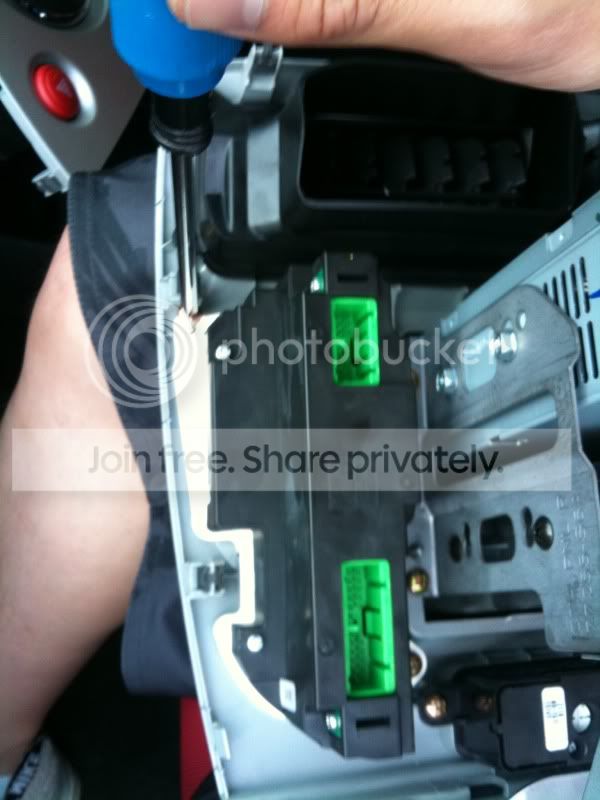
Mat's guide (with all due respect) briefly mentions that you can just take the heater controls off to get access to the screws on the side where it is blocked. From my experience, this is not an easy job, as unscrewing the whole heater unit (below)
Image

doesn't help as the exterior nobs :P for heater/fan/direction wont come off. The best way to get the OEM head unit screw off is to use a spanner, and the ONLY way to get the storage thing out is to use a cross head screwdriver that has a right angle bend to it, so you can get to it with the black heater thing in the way. Luckily I have neighbours with decent tools!
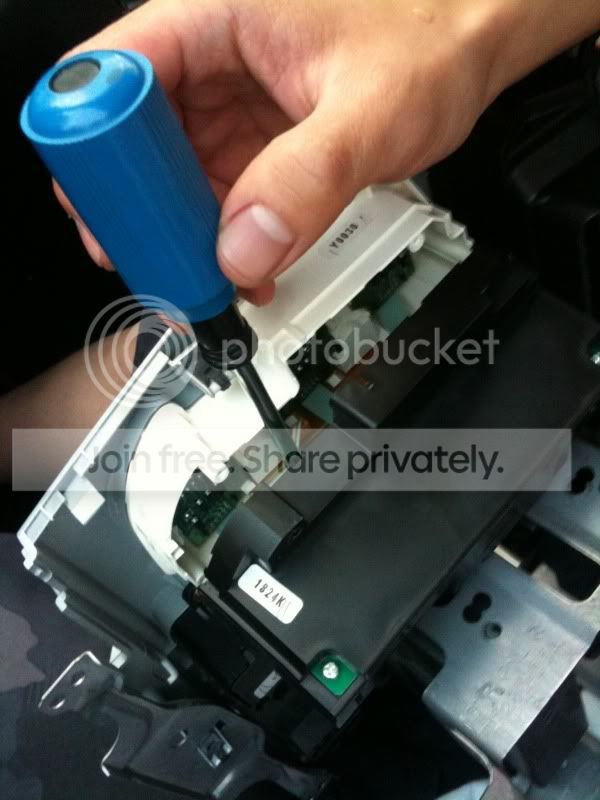
i even attempted to unscrew the black part of the heater, but this revealed sealed wires, like a computer motherboard, and couldnt see where to disconnect them as you would need the fingers of a 2 year old pianist and a dentist mirror.
Image

This was probably the most stressful part of the installation.

3. The next tough part was putting my autoparts facia in. (http://cgi.ebay.co.uk/ws/eBayISAPI.dll? ... 497wt_1199)

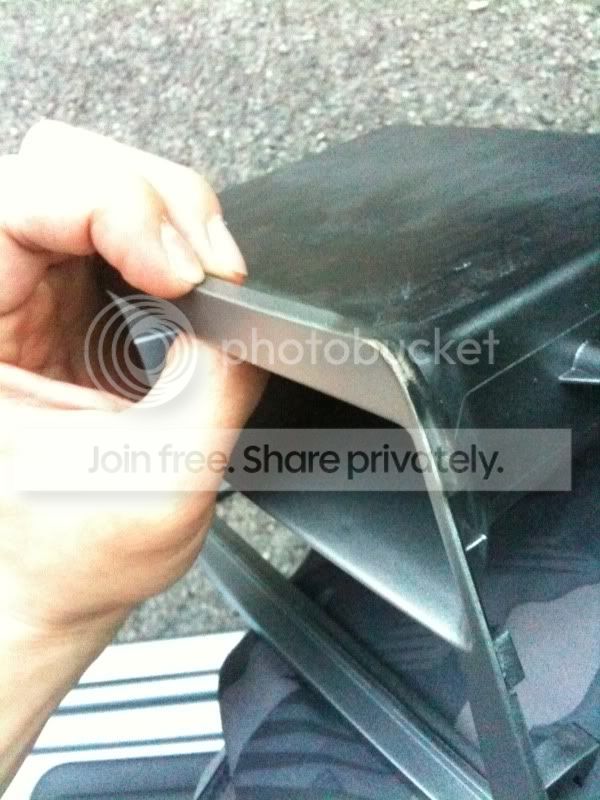
Now this was an absolute ballache to get in, as it doesn't really fit well. I found that the left of the facia was too big, and stopping it actually fitting in. I thought about sanding it down, but then couldnt find any sand paper. So i used a lighter to melt the plastic a bit on the outside. I had to melt and curve some of the left (passenger side) down for it to fit properly.

Image

Do this with a small flame, bit by bit. Don't try doing all of it at once cos you might melt it wrong. Try not to burn ur thumbs either when pushing the plastic down. Also if you're not comfortable using a lighter, PLEASE find some sandpaper.


Apart from those points, Mat's guide is spot on. Follow it step by step and you'll be well on your way. I'd also recommend connecting any potential wires you might use in the future (subwoofer/aux for ipod) so that you dont have to disconnect the panels again.

Thanks again to Mat and Devil84.

Jamie
long long title how many chars? lets see 123 ok more? yes 60

We have created lots of YouTube videos just so you can achieve [...]

Another post test yes yes yes or no, maybe ni? :-/

The best flat phpBB theme around. Period. Fine craftmanship and [...]

Do you need a super MOD? Well here it is. chew on this

All you need is right here. Content tag, SEO, listing, Pizza and spaghetti [...]

Lasagna on me this time ok? I got plenty of cash

this should be fantastic. but what about links,images, bbcodes etc etc? [...]